1. TDL_SDK Introduction
TDL_SDK (Turnkey Deep Learning SDK) is an out-of-the-box deep learning algorithm SDK based on computing chip products. We are committed to providing users with algorithm libraries and applications that are cross-platform (end and edge), easy to use, resource-saving, and high-performance. It is based on modular design, abstracting base classes for functional modules of the same type, following high cohesion and low coupling, exposing only base classes to the outside without exposing specific implementations; it is also scalable and maintainable.
1.1. TDL_SDK Overall Structure
tdl_sdk/
├── CMakeLists.txt # Root CMake build script
├── build_tdl_sdk.sh # SDK build script
├── clang-format.sh # Code formatting script
├── clang-tidy.sh # Code static analysis script
├── .clang-format # Clang format configuration
├── .clang-tidy # Clang static analysis configuration
├── cmake/ # CMake related modules
│ ├── opencv.cmake # OpenCV dependency search
│ ├── middleware.cmake # Multimedia software dependency search
│ ├── mlir.cmake # MLIR dependency lookup
│ └── thirdparty.cmake # Third-party library dependency search
├── configs/ # Model parameter configuration file
├── docs/ # Document directory
│ ├── README.md # Documentation
│ ├── LICENSE # License file
│ ├── getting_started/ # Getting Started
│ ├── developer_guide/ # Developer documentation
│ ├── api_reference/ # API Reference Manual
│ └── images/ # Document image resources
├── include/ # Header file exported externally
│ ├── framework/ # Framework layer API
│ ├── components/ # Component API
│ ├── nn/ # Neural Network Model API
│ ├── app/ # App class API
│ ├── pipeline/ # Pipeline API
│ └── c_apis/ # C language API
├── src/ # Internal implementation
│ ├── framework/ # Framework layer implementation
│ │ ├── common/ # Common tool implementation
│ │ ├── image/ # Image processing implementation
│ │ ├── memory/ # Memory management implementation
│ │ ├── model/ # Model implementation
│ │ ├── net/ # Neural network implementation
│ │ ├── preprocess/ # Preprocessing implementation
│ │ ├── tensor/ # Tensor processing implementation
│ │ └── utils/ # General tool implementation
│ ├── components/ # Component implementation
│ │ ├── cv/ # Implementation of vision-related detection classes
│ │ ├── encoder/ # Implementation of encoding related functions
│ │ ├── ive/ # ive image processing function implementation
│ │ ├── llm/ # Large model class implementation
│ │ ├── matcher/ # Implementation of feature matching function
│ │ ├── network/ # Implementation of network components
│ │ ├── nn/ # Neural network model implementation
│ │ ├── tracker/ # Target tracking implementation
│ │ ├── snapshot/ # Snapshot implementation
│ │ └── video_decoder/ # Camera and decoding implementation
│ ├── c_apis/ # C API wrapper
│ └── python/ # Python bindings
├── sample/ # Sample code
│ ├── cpp/ # C++ example
│ ├── c/ # C example
│ └── python/ # Python example
├── evaluation/ # Performance evaluation
├── tool/ # Toolset
├── toolchain/ # Toolchain
├── scripts/ # scripts
└── README.md # Project Description
1.2. framework module
To achieve a unified framework for cross-platform model reasoning, models deployed based on this framework can run on multiple hardware platforms. The framework includes the following modules:
common
Public definitions and tools, including error codes, logs, configuration, etc.
Provide common functions used across modules
image
Abstract encapsulation of image classes, supporting multiple image formats and data types
Provide basic functions such as image reading, conversion, and processing
Support OpenCV, VPSS and other backend implementations
memory
Abstract encapsulation of memory pool class for efficient memory management
Supports multiple memory types (system memory, device memory, etc.)
Provide memory allocation, release and reuse mechanisms
model
Abstract encapsulation of the model class, used to load and run neural network models
Support multiple model formats (ONNX, TensorFlow, PyTorch, etc.)
Provide model inference and optimization functions
net
Encapsulation of neural network class interface for inference results
Preprocessing
Abstract encapsulation of preprocessing class for image preprocessing
Supports multiple preprocessing operations (scaling, cropping, normalization, etc.)
Provides multiple backend implementations such as OpenCV, VPSS, etc.
tensor
An abstract encapsulation of the tensor class, used to represent the input and output of the neural network model
Support multiple data types and memory layouts
Provides tensor operations and conversion functions
utils
Encapsulation of tool interfaces, including timing counting, image alignment and calculation tools
1.3. components
Components related to specific algorithms include:
cv
Implementation of vision-related detection classes
Supports intrusion detection, motion detection and occlusion detection
encoder
Implementation of encoding class interface
Support rtsp streaming, real-time viewing of algorithm effects
ive
ive image processing function implementation
Use tpu for calculation
llm
Large model implementation
Support qwen and qwen2-VL
Matcher
Implementation of feature matching function
Supports computing using CPU or TPU
network
Implementation of network functions
nn
Implementation of various neural network models, such as target detection, face detection, license plate recognition, etc.
Provide model loading, reasoning and result parsing functions
snapshot
Implementation of snapshot function
track
Target tracking algorithm implementation
Support multiple tracking algorithms (KCF, SORT, DeepSORT, etc.)
video_decoder
Camera and decoding function implementation
Support multiple camera interfaces and decoding formats
1.4. other
c_apis: C language API encapsulation, providing cross-language call support
Provides C interface corresponding to C++ API functions
Support C language application integration
Provide memory management and error handling mechanisms
Sample: Sample code that shows how to use the SDK
C++ language examples, showing how to use the framework layer and component layer
C language examples, showing how to use the C API
Python language examples, showing how to use Python bindings
Evaluation: Performance evaluation, used to evaluate the performance of the SDK
Provide performance testing and benchmarking capabilities
Supports multiple performance indicators (throughput, latency, memory usage, etc.)
Provide performance analysis and optimization suggestions
Tool: tool set, providing development and debugging support
Model conversion tools
Performance analysis tools
Debugging and logging tools
Toolchain: Toolchain, providing compilation and building support
Cross-compilation toolchain
Dependent libraries and header files
Build scripts and configuration
scripts: scripts, providing automation support
Build script
Test script
Deployment script
2. TDL_SDK Environment Construction
2.1. Code Pulling and Overall Compilation
Except for the cmodel mode, TDL_SDK needs to rely on the sophpi sdk to run normally. The acquisition and compilation methods of the sophpi sdk are in the following URL:
https://github.com/sophgo/sophpi
Please follow the tutorial on the website to download the code. TDL_SDK will also be downloaded along with sophpi SDK. Before compiling, you need to execute export TPU_REL=1. Only in this way can TDL_SDK and other related libraries be compiled . The specific compilation process is as follows:
export TPU_REL=1
source build/envsetup_soc.sh
defconfig sg2002_wevb_riscv64_sd //You need to select the corresponding board model here
clean_all
build_all //Compile all components, including TDL_SDK
When compiling for the first time, be sure to complete the above steps.
2.2. TDL_SDK Compilation Method
After completing the above steps, you can compile only TDL_SDK. There are two compilation methods:
Compile using the pseudo target defined by makefile
build_tdl_sdk
If the compilation fails, use clean_tdl_sdk to clear the old compilation products and then recompile.
Compile using the build_tdl_sdk.sh script
cd tdl_sdk
./build_tdl_sdk.sh all
If the compilation fails, first use ./build_tdl_sdk.sh clean to clear the old compilation products and then recompile.
build_tdl_sdk.sh provides some compilation configurations for selection, as follows:
./build_tdl_sdk.sh sample //Compile only the sample. This is used when only the contents of the sample folder are modified to save compilation time.
./build_tdl_sdk.sh static //The compiled sample is a static file. Note that the static parameter only affects the sample. TDL_SDK will still compile static and dynamic libraries.
./build_tdl_sdk.sh debug //Introduce debug information during compilation, only used during debugging
2.3. Cmodel Mode
TDL_SDK supports cmodel mode, which can simulate the chip’s operation logic on the PC side, allowing the sample to run tests directly on the PC side simulating the chip side. The cmodel is used as follows:
Download third-party dependency libraries
cd tdl_sdk
./scripts/download_thirdparty.sh
Get compilation dependencies
./scripts/extract_cvitek_tpu_sdk.sh
Compile TDL_SDK
./build_tdl_sdk.sh CMODEL_CVITE
If the compilation fails, first use ./build_tdl_sdk.sh clean to clear the old compilation products and then recompile.
3. Model List
3.1. Object detection model list
Model Name |
Description |
TDL_MODEL_MBV2_DET_PERSON |
Human Detection Model(0:person) |
TDL_MODEL_YOLOV8N_DET_HAND |
Hand Detection Model(0:hand) |
TDL_MODEL_YOLOV8N_DET_PET _PERSON |
Pet and Person Detection Model (0:cat, 1:dog, 2:person) |
TDL_MODEL_YOLOV8N_DET_PERSON _VEHICLE |
Person and Vehicle Detection Model (0:car, 1:bus, 2:truck, 3:motorcyclist, 4:person, 5:bicycle, 6:motorcycle) |
TDL_MODEL_YOLOV8N_DET_HAND _FACE_PERSON |
Hand, Face and Person Detection Model (0:hand, 1:face, 2:person) |
TDL_MODEL_YOLOV8N_DET_HEAD _PERSON |
Head Detection Model (0:person, 1:head) |
TDL_MODEL_YOLOV8N_DET_HEAD _HARDHAT |
Head and Hardhat Detection Model (0:head, 1:hardhat) |
TDL_MODEL_YOLOV8N_DET_FIRE _SMOKE |
Fire and Smoke Detection Model (0:fire, 1:smoke) |
TDL_MODEL_YOLOV8N_DET_FIRE |
Fire Detection Model (0:fire) |
TDL_MODEL_YOLOV8N_DET_HEAD _SHOULDER |
Head and Shoulder Detection Model (0:head-shoulder) |
TDL_MODEL_YOLOV8N_DET_LICENSE _PLATE |
License Plate Detection Model (0:license plate) |
TDL_MODEL_YOLOV8N_DET_TRAFFIC _LIGHT |
Traffic Light Detection Model (0:red, 1:yellow, 2:green, 3:off, 4:waiting) |
TDL_MODEL_YOLOV8N_DET_MONITOR _PERSON |
Person Detection Model(0:person) |
TDL_MODEL_YOLOV5_DET_COCO80 |
YOLOv5 COCO80 Detection Model |
TDL_MODEL_YOLOV6_DET_COCO80 |
YOLOv6 COCO80 Detection Model |
TDL_MODEL_YOLOV7_DET_COCO80 |
YOLOv7 COCO80 Detection Model |
TDL_MODEL_YOLOV8_DET_COCO80 |
YOLOv8 COCO80 Detection Model |
TDL_MODEL_YOLOV10_DET_COCO80 |
YOLOv10 COCO80 Detection Model |
TDL_MODEL_PPYOLOE_DET_COCO80 |
PPYOLOE COCO80 Detection Model |
TDL_MODEL_YOLOX_DET_COCO80 |
YOLOX COCO80 Detection Model |
3.2. Face detection model list
Model Name |
Description |
TDL_MODEL_SCRFD_DET_FACE |
Face Detection Model (0:face + keypoints) |
TDL_MODEL_RETINA_DET_FACE |
Face Detection Model |
TDL_MODEL_RETINA_DET_FACE_IR |
Infrared Face Detection Model |
3.3. Face attribute and keypoint model list
Model Name |
Description |
TDL_MODEL_KEYPOINT_FACE_V2 |
Face Detection Model with 5 Keypoints and Blur Score |
TDL_MODEL_CLS_ATTRIBUTE_GENDER _AGE_GLASS |
Face Attribute Classification Model (age, gender, glasses) |
TDL_MODEL_CLS_ATTRIBUTE_GENDER _AGE_GLASS_MASK |
Face Attribute Classification Model (age, gender, glasses, mask) |
TDL_MODEL_CLS_ATTRIBUTE_GENDER _AGE_GLASS_EMOTION |
Face Attribute Classification Model (age, gender, glasses, emotion) |
3.4. Image classification model list
Model Name |
Description |
TDL_MODEL_CLS_MASK |
Mask Detection Model (0:wearing mask, 1:not wearing mask) |
TDL_MODEL_CLS_RGBLIVENESS |
Liveness Detection Model (0:real, 1:fake) |
TDL_MODEL_CLS_ISP_SCENE |
ISP Scene Classification Model |
TDL_MODEL_CLS_HAND_GESTURE |
Hand Gesture Classification Model (0:fist, 1:five fingers, 2:none, 3:two) |
TDL_MODEL_CLS_KEYPOINT_HAND _GESTURE |
Hand Gesture Keypoint Classification Model (0:fist, 1:five fingers, 2:four fingers, 3:none, 4:ok, 5:one, 6:three, 7:three2, 8:two) |
3.5. Sound classification model list
Model Name |
Description |
TDL_MODEL_CLS_SOUND_BABAY_CRY |
Baby Cry Sound Classification Model (0:background, 1:crying) |
TDL_MODEL_CLS_SOUND_COMMAND _NIHAOSHIYUN |
Command Sound Classification Model (0:background, 1:nihaoshiyun) |
TDL_MODEL_CLS_SOUND_COMMAND _NIHAOSUANNENG |
Command Sound Classification Model (0:background, 1:nihaosuanneng) |
TDL_MODEL_CLS_SOUND_COMMAND _XIAOAIXIAOAI |
Command Sound Classification Model (0:background, 1:xiaoaixiaoai) |
TDL_MODEL_CLS_SOUND_COMMAND |
Command Sound Classification Model |
3.6. Keypoint model list
Model Name |
Description |
TDL_MODEL_KEYPOINT_LICENSE _PLATE |
License Plate Keypoint Detection Model |
TDL_MODEL_KEYPOINT_HAND |
Hand Keypoint Detection Model |
TDL_MODEL_KEYPOINT _YOLOV8POSE_PERSON17 |
Human 17 Keypoint Detection Model |
TDL_MODEL_KEYPOINT _SIMCC_PERSON17 |
SIMCC 17 Keypoint Detection Model |
3.7. Lane detection model list
Model Name |
Descriptio |
TDL_MODEL_LSTR_DET_LANE |
Lane Detection Model |
3.8. License plate recognition model list
Model Name |
Descriptio |
TDL_MODEL_RECOGNITION_LICENSE _PLATE |
License Plate Recognition Model |
3.9. Segmentation model list
Model Name |
Descriptio |
TDL_MODEL_YOLOV8_SEG_COCO80 |
YOLOv8 COCO80 Segmentation Model |
TDL_MODEL_SEG_PERSON_FACE_VEHICLE |
Person, Face and Vehicle Segmentation Model (0:background, 1:person, 2:face, 3:vehicle, 4:license plate) |
TDL_MODEL_SEG_MOTION |
Motion Segmentation Model (0:static, 2:transition, 3:motion) |
3.10. Feature extraction model list
Model Name |
Descriptio |
TDL_MODEL_FEATURE_IMG |
Image Feature Extraction Model |
TDL_MODEL_IMG_FEATURE_CLIP |
Image Clip Feature Extraction Model |
TDL_MODEL_TEXT_FEATURE_CLIP |
Text Clip Feature Extraction Model |
TDL_MODEL_FEATURE_CVIFACE |
cviface 256-dimensional Feature Extraction Model |
TDL_MODEL_FEATURE_BMFACE_R34 |
ResNet34 512-dimensional Feature Extraction Model |
TDL_MODEL_FEATURE_BMFACE_R50 |
ResNet50 512-dimensional Feature Extraction Model |
4. Structure Reference
4.1. TDLDataTypeE
【Description】
Data Type Enumeration Class
【Definition】
typedef enum {
  TDL_TYPE_INT8 = 0, /**< Equals to int8_t. */
  TDL_TYPE_UINT8,    /**< Equals to uint8_t. */
  TDL_TYPE_INT16,    /**< Equals to int16_t. */
  TDL_TYPE_UINT16,   /**< Equals to uint16_t. */
  TDL_TYPE_INT32,    /**< Equals to int32_t. */
  TDL_TYPE_UINT32,   /**< Equals to uint32_t. */
  TDL_TYPE_BF16,     /**< Equals to bf17. */
  TDL_TYPE_FP16,     /**< Equals to fp16. */
  TDL_TYPE_FP32,     /**< Equals to fp32. */
  TDL_TYPE_UNKOWN    /**< Equals to unkown. */
} TDLDataTypeE;
【Members】
Data Type Enumeration |
Description |
TDL_TYPE_INT8 |
Signed 8-bit integer |
TDL_TYPE_UINT8 |
Unsigned 8-bit integer |
TDL_TYPE_INT16 |
Signed 16-bit integer |
TDL_TYPE_UINT16 |
Unsigned 16-bit integer |
TDL_TYPE_INT32 |
Signed 32-bit integer |
TDL_TYPE_UINT32 |
Unsigned 32-bit integer |
TDL_TYPE_BF16 |
16-bit floating point (1 sign bit, 8 exponent bits, 7 mantissa bits) |
TDL_TYPE_FP16 |
16-bit floating point (1 sign bit, 5 exponent bits, 10 mantissa bits) |
FTDL_TYPE_FP32 |
32-bit floating point |
4.2. TDLBox
【Description】
Box coordinate data
【Definition】
typedef struct {
  float x1;
  float y1;
  float x2;
  float y2;
} TDLBox;
【Members】
Data Type |
Description |
x1 |
x coordinate of top-left corner |
y1 |
y coordinate of top-left corner |
x2 |
x coordinate of bottom-right corner |
y2 |
y coordinate of bottom-right corner |
4.3. TDLFeature
【Description】
Feature value data
【Definition】
typedef struct {
  int8_t *ptr;
  uint32_t size;
  TDLDataTypeE type;
} TDLFeature;
【Members】
Data Type |
Description |
ptr |
Feature value data |
size |
Data size |
type |
Data type |
4.4. TDLPoints
【Description】
Coordinate queue data
【Definition】
typedef struct {
  float *x;
  float *y;
  uint32_t size;
  float score;
} TDLPoints;
【Members】
Data Type |
Description |
x |
x coordinate queue data |
y |
y coordinate queue data |
size |
Size of coordinate queue |
score |
Score |
4.5. TDLLandmarkInfo
【Description】
Feature point information
【Definition】
typedef struct {
  float x;
  float y;
  float score;
} TDLLandmarkInfo;
【Members】
Data Type |
Description |
x |
x coordinate of feature point |
y |
y coordinate of feature point |
score |
Score |
4.6. TDLObjectInfo
【Description】
Object detection information
【Definition】
typedef struct {
  TDLBox box;
  float score;
  int class_id;
  uint32_t landmark_size;
  TDLLandmarkInfo *landmark_properity;
  TDLObjectTypeE obj_type;
} TDLObjectInfo;
【Members】
Data Type |
Description |
score |
Object detection score |
class_id |
Object detection class id |
landmark_size |
Size of object detection feature points |
TDLLandmarkInfo |
Object detection feature point information |
obj_type |
Object detection type |
4.7. TDLObject
【Description】
Object detection data
【Definition】
typedef struct {
  uint32_t size;
  uint32_t width;
  uint32_t height;

  TDLObjectInfo *info;
} TDLObject;
【Members】
Data Type |
Description |
size |
Number of detected objects |
width |
Width of detection image |
height |
Height of detection image |
info |
Object detection information |
4.8. TDLFaceInfo
【Description】
Face information
【Definition】
typedef struct {
  char name[128];
  float score;
  uint64_t track_id;
  TDLBox box;
  TDLPoints landmarks;
  TDLFeature feature;

  float gender_score;
  float glass_score;
  float age;
  float liveness_score;
  float hardhat_score;
  float mask_score;

  float recog_score;
  float face_quality;
  float pose_score;
  float blurness;
} TDLFaceInfo;
【Members】
Data Type |
Description |
name |
Face name |
score |
Face score |
track_id |
Face tracking id |
box |
Face box information |
landmarks |
Face feature points |
feature |
Face feature value |
gender_score |
Face gender score |
glass_score |
Whether wearing glasses |
age |
Face age |
liveness_score |
Face liveness score |
hardhat_score |
Face hardhat score |
recog_score |
Face recognition score |
face_quality |
Face quality score |
pose_score |
Face pose score |
blurness |
Face blur degree |
4.9. TDLFace
【Description】
Face data
【Definition】
typedef struct {
  uint32_t size;
  uint32_t width;
  uint32_t height;
  TDLFaceInfo *info;
} TDLFace;
【Members】
Data Type |
Description |
size |
Number of faces |
width |
Width of face image |
height |
Height of face image |
info |
Face information |
4.10. TDLClassInfo
【Description】
Classification information
【Definition】
typedef struct {
  int32_t class_id;
  float score;
} TDLClassInfo;
【Members】
Data Type |
Description |
class_id |
Classification class |
score |
Classification score |
4.11. TDLClass
【Description】
Classification data
【Definition】
typedef struct {
  uint32_t size;
  TDLClassInfo *info;
} TDLClass;
【Members】
Data Type |
Description |
size |
Number of classifications |
info |
Classification information |
4.12. TDLKeypointInfo
【Description】
Keypoint information
【Definition】
typedef struct {
  float x;
  float y;
  float score;
} TDLKeypointInfo;
【Members】
Data Type |
Description |
x |
x coordinate of keypoint |
y |
y coordinate of keypoint |
score |
Keypoint score |
4.13. TDLKeypoint
【Description】
Keypoint data
【Definition】
typedef struct {
  uint32_t size;
  uint32_t width;
  uint32_t height;
  TDLKeypointInfo *info;
} TDLKeypoint;
【Members】
Data Type |
Description |
size |
Number of keypoints |
width |
Image width |
height |
Image height |
info |
Keypoint information |
4.14. TDLSegmentation
【Description】
Semantic segmentation data
【Definition】
typedef struct {
  uint32_t width;
  uint32_t height;
  uint32_t output_width;
  uint32_t output_height;
  uint8_t *class_id;
  uint8_t *class_conf;
} TDLSegmentation;
【Members】
Data Type |
Description |
width |
Image width |
height |
Image height |
output_width |
Output image width |
output_height |
Output image height |
class_id |
Classification class |
class_conf |
Classification coordinate information |
4.15. TDLInstanceSegInfo
【Description】
Instance segmentation information
【Definition】
typedef struct {
  uint8_t *mask;
  float *mask_point;
  uint32_t mask_point_size;
  TDLObjectInfo *obj_info;
} TDLInstanceSegInfo;
4.16. TDLInstanceSeg
【Description】
Instance segmentation data
【Definition】
typedef struct {
  uint32_t size;
  uint32_t width;
  uint32_t height;
  uint32_t mask_width;
  uint32_t mask_height;
  TDLInstanceSegInfo *info;
} TDLInstanceSeg;
【Members】
Data Type |
Description |
size |
Number of instance segmentations |
width |
Image width |
height |
Image height |
mask_width |
Mask width |
mask_height |
Mask height |
info |
Instance segmentation information |
4.17. TDLLanePoint
【Description】
Lane detection coordinate points
【Definition】
typedef struct {
  float x[2];
  float y[2];
  float score;
} TDLLanePoint;
【Members】
Data Type |
Description |
x |
x coordinate queue |
y |
y coordinate queue |
score |
Lane detection score |
4.18. TDLLane
【Description】
Lane detection data
【Definition】
typedef struct {
  uint32_t size;
  uint32_t width;
  uint32_t height;
  TDLLanePoint *lane;
  int lane_state;
} TDLLane;
【Members】
Data Type |
Description |
size |
Number of lane detections |
width |
Image width |
height |
Image height |
lane |
Lane detection coordinate points |
lane_state |
Lane state |
4.19. TDLDepthLogits
【Description】
Depth estimation data
【Definition】
typedef struct {
  int w;
  int h;
  int8_t *int_logits;
} TDLDepthLogits;
【Members】
Data Type |
Description |
w |
Image width |
h |
Image height |
int_logits |
Depth estimation information |
4.20. TDLTracker
【Description】
Tracking data
【Definition】
typedef struct {
  uint32_t size;
  uint64_t id;
  TDLBox bbox;
  int out_num;
} TDLTracker;
【Members】
Data Type |
Description |
size |
Number of tracked targets |
id |
Tracking target ID |
bbox |
Tracking target bounding box |
out_num |
Number of times target is out of frame |
4.21. TDLOcr
【Description】
Text recognition data
【Definition】
typedef struct {
  uint32_t size;
  char* text_info;
} TDLOcr;
【Members】
Data Type |
Description |
size |
Number of text recognitions |
text_info |
Text recognition information |
4.22. TDLSnapshotInfo
【Description】
Snapshot information
【Definition】
typedef struct {
  float quality;
  uint64_t snapshot_frame_id;
  uint64_t track_id;
  bool male;
  bool glass;
  uint8_t age;
  uint8_t emotion;
  TDLImage object_image;
} TDLSnapshotInfo;
【Members】
Data Type |
Description |
quality |
The quality of the captured image |
snapshot_frame_id |
Frame ID |
track_id |
Tracking ID |
male |
Gender score |
glass |
Glasses score |
age |
Age score |
emotion |
Emotional state |
object_image |
The captured image object |
4.23. TDLCaptureInfo
【Description】
Capture parameter structure
【Definition】
typedef struct {
  uint32_t snapshot_size;
  uint64_t frame_id;
  uint32_t frame_width;
  uint32_t frame_height;
  TDLFace face_meta;
  TDLObject person_meta;
  TDLObject pet_meta;
  TDLTracker track_meta;
  TDLSnapshotInfo *snapshot_info;
  TDLFeature *features;
  TDLImage image;
} TDLCaptureInfo;
【Members】
Data Type |
Description |
snapshot_size |
Number of snapshots |
frame_id |
Frame ID |
frame_width |
Frame width |
frame_height |
Frame height |
face_meta |
Facial data |
person_meta |
Pedestrian data |
pet_meta |
Pet data |
track_meta |
Tracking data |
snapshot_info |
Snapshot information |
features |
Eigenvalue information |
image |
Original image for detection |
4.24. TDLObjectCountingInfo
【Description】
Passenger flow statistics
【Definition】
typedef struct {
  uint64_t frame_id;
  uint32_t frame_width;
  uint32_t frame_height;
  uint32_t enter_num;
  uint32_t miss_num;
  int counting_line[4];
  TDLObject object_meta;
  TDLImage image;
} TDLObjectCountingInfo;
【Members】
Data Type |
Description |
frame_id |
Frame ID |
frame_width |
Frame width |
frame_height |
Frame height |
enter_num |
Number of entries |
miss_num |
The amount of outgoing |
counting_line |
Crossing line, usually located at the key channel |
object_meta |
Target object data |
image |
Original image for detection |
4.25. TDLIspMeta
【Description】
ISP data
【Definition】
typedef struct {
  float awb[3];  // rgain, ggain, bgain
  float ccm[9];  // rgb[3][3]
  float blc;
} TDLIspMeta;
【Members】
Data Type |
Description |
awb |
White balance information |
ccm |
Color information |
blc |
Black level information |
5. API Reference
5.1. Handles
【Syntax】
typedef void *TDLHandle;
typedef void *TDLHandleEx;
typedef void *TDLImage;
【Description】
TDL SDK handles, TDLHandle is the core operation handle, TDLHandleEx is the extended operation handle, TDLImage is the image data abstraction handle.
5.2. TDL_CreateHandle
【Syntax】
TDLHandle TDL_CreateHandle(const int32_t tpu_device_id);
【Description】
Create a TDLHandle object for the management of the TDL API, which is used when using the API in the core library (libtdl_core.a or libtdl_core.so).
【Parameters】
Data Type |
Parameter Name |
Description |
|
|---|---|---|---|
Input |
const int32_t |
tpu_device_id |
Specified TPU device ID |
5.3. TDL_CreateHandleEx
【Syntax】
TDLHandleEx TDL_CreateHandleEx(const int32_t tpu_device_id);
【Description】
Create a TDLHandleEx object for managing the TDL extended API, which is used when using the API in the extended library (libtdl_ex.a or libtdl_ex.so).
【Parameters】
Data Type |
Parameter Name |
Description |
|
|---|---|---|---|
Input |
const int32_t |
tpu_device_id |
Specified TPU device ID |
5.4. TDL_DestroyHandle
【Syntax】
int32_t TDL_DestroyHandle(TDLHandle handle);
【Description】
Destroys a TDLHandle object, used when using APIs in the core library (libtdl_core.a or libtdl_core.so).
【Parameters】
Data Type |
Parameter Name |
Description |
|
|---|---|---|---|
Input |
TDLHandle |
handle |
TDLHandle object to be destroyed |
5.5. TDL_DestroyHandleEx
【Syntax】
int32_t TDL_DestroyHandleEx(TDLHandleEx handle);
【Description】
Destroy a TDLHandleEx object, which is used when using APIs in the extension library (libtdl_ex.a or libtdl_ex.so).
【Parameters】
Data Type |
Parameter Name |
Description |
|
|---|---|---|---|
Input |
TDLHandle |
handle |
TDLHandleEx object to be destroyed |
5.6. TDL_WrapVPSSFrame
【Syntax】
TDLImage TDL_WrapVPSSFrame(void *vpss_frame, bool own_memory);
【Description】
Wraps a VPSS frame as a TDLImage object, where the frame can be a frame obtained through the multimedia interface (For example, CVI_VPSS_GetChnFrame); it can also be a frame encapsulated by itself, as shown below.
VIDEO_FRAME_INFO_S Frame;
memset(&Frame, 0, sizeof(VIDEO_FRAME_INFO_S));
Frame.stVFrame.pu8VirAddr[0] = buffer; // virtual address of data
Frame.stVFrame.u32Height = 1; // The height of the data. This example is one-dimensional data, so it is 1 here.
Frame.stVFrame.u32Width = u32BufferSize; // The width of the data. The example is one-dimensional data. Here is the data amount

TDLImage image = TDL_WrapVPSSFrame((void *)&Frame, false); // Call the interface to create an image
【Parameters】
Data Type |
Parameter Name |
Description |
|
|---|---|---|---|
Input |
void* |
vpss_frame |
VPSS frame to be wrapped |
Input |
bool |
own_memory |
Whether to own the memory |
5.7. TDL_ReadImage
【Syntax】
TDLImage TDL_ReadImage(const char *path);
【Description】
Read an image as a TDLImage object, supporting common input formats such as jpg, png, bmp, jp2, sr, and tiff .
【Parameters】
Data Type |
Parameter Name |
Description |
|
|---|---|---|---|
Input |
const char* |
path |
Image path |
5.8. TDL_ReadBin
【Syntax】
TDLImage TDL_ReadBin(const char *path, int count, TDLDataTypeE data_type);
【Description】
Read file content as a TDLImageHandle object.
【Parameters】
Data Type |
Parameter Name |
Description |
|
|---|---|---|---|
Input |
const char* |
path |
Binary file path |
Input |
int |
count |
Data count in file |
Input |
TDLDataTypeE |
data_type |
Input data type |
5.9. TDL_DestroyImage
【Syntax】
int32_t TDL_DestroyImage(TDLImage image_handle);
【Description】
Destroy a TDLImage object. When you finish using a TDLImage object, you must call this interface to release the memory.
【Parameters】
Data Type |
Parameter Name |
Description |
|
|---|---|---|---|
Input |
TDLImage |
image_handle |
TDLImageHandle object to be destroyed |
5.10. TDL_OpenModel
【Syntax】
int32_t TDL_OpenModel(TDLHandle handle,
                                    const TDLModel model_id,
                                    const char *model_path,
                                    const char *model_config_json);
【Description】
Loads a model of the specified type into a TDLHandle object. For the parameter model_config_json, NULL can be passed if it is loaded using TDL_LoadModelConfig. Without using TDL_LoadModelConfig to load, most proprietary models can also pass in NULL, in which case the default configuration inside the algorithm class will be used. Some common models, such as feature extraction and voice commands, require model configuration information to be passed in. Please refer to configs/model/model_config.json.
【Parameters】
Data Type |
Parameter Name |
Description |
|
|---|---|---|---|
Input |
TDLHandle |
handle |
TDLHandle object |
Input |
const TDLModel |
model_id |
Model type enumeration |
Input |
const char* |
model_path |
The path of the model configuration file. The file path is in tdl_sdk/install/CV184X/configs/model/. If the model does not require special parameters, it can be NULL |
5.11. TDL_OpenModelFromBuffer
【Syntax】
int32_t TDL_OpenModelFromBuffer(TDLHandle handle,
                                                  const TDLModel model_id,
                                                  const uint8_t *model_buffer,
                                                  uint32_t model_buffer_size,
                                                  const char *model_config_json);
【Description】
Loads a model of the specified type into a TDLHandle object, passing the parameter by address. For the parameter model_config_json, NULL can be passed if it is loaded using TDL_LoadModelConfig; Without using TDL_LoadModelConfig to load, most proprietary models can also pass in NULL, in which case the default configuration inside the algorithm class will be used. Some common models, such as feature extraction and voice commands, require model configuration information to be passed in. Please refer to configs/model/model_config.json.
Data Type |
Parameter Name |
Description |
|
|---|---|---|---|
Input |
TDLHandle |
handle |
TDLHandle object |
Input |
const TDLModel |
model_id |
Model type enumeration |
Input |
const char* |
model_path |
The path of the model configuration file. The file path is in tdl_sdk/install/CV184X/configs/model/. If the model does not require special parameters, it can be NULL |
5.12. TDL_CloseModel
【Syntax】
int32_t TDL_CloseModel(TDLHandle handle,
                                    const TDLModel model_id);
【Description】
Unload the specified type of model and release related resources.
【Parameters】
Data Type |
Parameter Name |
Description |
|
|---|---|---|---|
Input |
TDLHandle |
handle |
TDLHandle object |
Input |
const TDLModel |
model_id |
Model type enumeration |
5.13. TDL_Detection
【Syntax】
int32_t TDL_Detection(TDLHandle handle,
                                  const TDLModel model_id,
                                  TDLImage image_handle,
                                  TDLObject *object_meta);
【Description】
Performs inference detection on the specified model and returns the detection result metadata. For detailed examples, see tdl_sdk/sample/c/sample_object_detection.c.
【Parameters】
Data Type |
Parameter Name |
Description |
|
|---|---|---|---|
Input |
TDLHandle |
handle |
TDLHandle object |
Input |
const TDLModel |
model_id |
Model type enumeration |
Input |
TDLImage |
image_handle |
TDLImageHandle object |
Output |
TDLObject* |
object_meta |
Output detection result metadata |
5.14. TDL_FaceDetection
【Syntax】
int32_t TDL_FaceDetection(TDLHandle handle,
                                        const TDLModel model_id,
                                        TDLImage image_handle,
                                        TDLFace *face_meta);
【Description】
Perform face detection and return face detection result metadata. For detailed examples, see tdl_sdk/sample/c/sample_face_detection.c.
【Parameters】
Data Type |
Parameter Name |
Description |
|
|---|---|---|---|
Input |
TDLHandle |
handle |
TDLHandle object |
Input |
const TDLModel |
model_id |
Model type enumeration |
Input |
TDLImage |
image_handle |
TDLImageHandle object |
Output |
TDLFace* |
face_meta |
Output face detection result metadata |
5.15. TDL_FaceAttribute
【Syntax】
int32_t TDL_FaceAttribute(TDLHandle handle,
                                        const TDLModel model_id,
                                        TDLImage image_handle,
                                        TDLFace *face_meta);
【Description】
To perform facial attribute analysis, you need to use the detected face frame for feature analysis. The model will crop the image internally to improve accuracy. Therefore, before calling this interface, it is best to call TDL_FaceDetection to obtain the face frame image. For detailed examples, please refer to tdl_sdk/sample/c/sample_face_attribute.c. If there is no box map data in face_meta, no cropping is performed.
【Parameters】
Data Type |
Parameter Name |
Description |
|
|---|---|---|---|
Input |
TDLHandle |
handle |
TDLHandle object |
Input |
const TDLModel |
model_id |
Model type enumeration |
Input |
TDLImage |
image_handle |
TDLImageHandle object |
Input/Output |
TDLFace* |
face_meta |
Input face detection results, output additional attribute information |
5.16. TDL_FaceLandmark
【Syntax】
int32_t TDL_FaceLandmark(TDLHandle handle,
                                        const TDLModel model_id,
                                        TDLImage image_handle,
                                        TDLImage *crop_image_handle,
                                        TDLFace *face_meta);
【Description】
Perform facial key point detection and add key point coordinates to the existing face detection results. The model will crop the image internally to improve accuracy. Therefore, before calling this interface, it is best to call TDL_FaceDetection to obtain the face frame image. For detailed examples, please refer to tdl_sdk/sample/c/sample_face_recognition.c. If there is no box map data in face_meta, no cropping is performed.
【Parameters】
Data Type |
Parameter Name |
Description |
|
|---|---|---|---|
Input |
TDLHandle |
handle |
TDLHandle object |
Input |
const TDLModel |
model_id |
Model type enumeration |
Input |
TDLImage |
image_handle |
TDLImageHandle object |
Input |
TDLImage |
crop_image_handle |
TDLImageHandle object, the cropped image. It will not take effect if it is NULL. |
Input/Output |
TDLFace* |
face_meta |
Input face detection results, output additional keypoint coordinates |
5.17. TDL_Classification
【Syntax】
int32_t TDL_Classification(TDLHandle handle,
                                        const TDLModel model_id,
                                        TDLImage image_handle,
                                        TDLClassInfo *class_info);
【Description】
Performs general classification recognition, including liveness recognition, speech recognition, and gesture recognition. For details, see tdl_sdk/sample/c/sample_classification.c.
【Parameters】
Data Type |
Parameter Name |
Description |
|
|---|---|---|---|
Input |
TDLHandle |
handle |
TDLHandle object |
Input |
const TDLModel |
model_id |
Model type enumeration |
Input |
TDLImage |
image_handle |
TDLImageHandle object |
Output |
TDLClassInfo* |
class_info |
Output classification results |
5.18. TDL_InstanceSegmentation
【Syntax】
int32_t TDL_InstanceSegmentation(TDLHandle handle,
                                                  const TDLModel model_id,
                                                  TDLImage image_handle,
                                                  TDLInstanceSeg *inst_seg_meta);
【Description】
Perform instance segmentation to detect the pixel-level outline of each individual object in the image. For details, please refer to tdl_sdk/sample/c/sample_instance_segmentation.c.
【Parameters】
Data Type |
Parameter Name |
Description |
|
|---|---|---|---|
Input |
TDLHandle |
handle |
TDLHandle object |
Input |
const TDLModel |
model_id |
Model type enumeration |
Input |
TDLImage |
image_handle |
TDLImageHandle object |
Output |
TDLInstanceSeg* |
inst_seg_meta |
Output instance segmentation results (including mask and bbox) |
5.19. TDL_SemanticSegmentation
【Syntax】
int32_t TDL_SemanticSegmentation(TDLHandle handle,
                                                    const TDLModel model_id,
                                                    TDLImage image_handle,
                                                    TDLSegmentation *seg_meta);
【Description】
Perform semantic segmentation to classify images at the pixel level. For details, please refer to tdl_sdk/sample/c/sample_semantic_segmentation.c.
【Parameters】
Data Type |
Parameter Name |
Description |
|
|---|---|---|---|
Input |
TDLHandle |
handle |
TDLHandle object |
Input |
const TDLModel |
model_id |
Model type enumeration |
Input |
TDLImage |
image_handle |
TDLImageHandle object |
Output |
TDLSegmentation* |
seg_meta |
Output segmentation results (label map) |
5.20. TDL_FeatureExtraction
【Syntax】
int32_t TDL_FeatureExtraction(TDLHandle handle,
                                             const TDLModel model_id,
                                             TDLImage image_handle,
                                             TDLFeature *feature_meta);
【Description】
Extract the depth feature vector of the image. In order to improve the detection accuracy, the input image is preferably processed by cropping or alignment. Please refer to tdl_sdk/sample/c/sample_face_recognition.c.
【Parameters】
Data Type |
Parameter Name |
Description |
|
|---|---|---|---|
Input |
TDLHandle |
handle |
TDLHandle object |
Input |
const TDLModel |
model_id |
Model type enumeration |
Input |
TDLImage |
image_handle |
TDLImageHandle object |
Output |
TDLFeature* |
feature_meta |
Output feature vector |
5.21. TDL_LaneDetection
【Syntax】
int32_t TDL_LaneDetection(TDLHandle handle,
                                        const TDLModel model_id,
                                        TDLImage image_handle,
                                        TDLLane *lane_meta);
【Description】
Detect road lane lines and their attributes. For details, please refer to tdl_sdk/sample/c/sample_lane_detection.c.
【Parameters】
Data Type |
Parameter Name |
Description |
|
|---|---|---|---|
Input |
TDLHandle |
handle |
TDLHandle object |
Input |
const TDLModel |
model_id |
Model type enumeration |
Input |
TDLImage |
image_handle |
TDLImageHandle object |
Output |
TDLLane* |
lane_meta |
Output lane line coordinates and attributes |
5.22. TDL_Tracking
【Syntax】
int32_t TDL_Tracking(TDLHandle handle,
                                  const TDLModel model_id,
                                  TDLImage image_handle,
                                  TDLObject *object_meta,
                                  TDLTracker *tracker_meta);
【Description】
Multi-target tracking, cross-frame target association based on detection results. For details, please refer to tdl_sdk/sample/c/sample_tracking.c.
【Parameters】
Data Type |
Parameter Name |
Description |
|
|---|---|---|---|
Input |
TDLHandle |
handle |
TDLHandle object |
Input |
const TDLModel |
model_id |
Model type enumeration |
Input |
TDLImage |
image_handle |
TDLImageHandle object |
Input/Output |
TDLObject* |
object_meta |
Input detection results, output tracking IDs |
Output |
TDLTracker* |
tracker_meta |
Output tracker status information |
5.23. TDL_SetSingleObjectTracking
【Syntax】
int32_t TDL_SetSingleObjectTracking(TDLHandle handle,
                                                      TDLImage image_handle,
                                                      TDLObject *object_meta,
                                                      int *set_values,
                                                      int size);
【Description】
Monocular tracking sets the tracking target. It should be used in conjunction with TDL_Detection according to the scene. For details, please refer to tdl_sdk/sample/c/camera/sample_vi_single_object_tracking.c.
【Parameters】
Data Type |
Parameter Name |
Description |
|
|---|---|---|---|
Input |
TDLHandle |
handle |
TDLHandle object |
Input |
TDLImage |
image_handle |
TDLImage object |
Input |
TDLObject* |
object_meta |
Current frame detection result |
Input/Output |
int* |
set_values |
Tracking targets. Supports the following three methods: 1. Pass in the target frame coordinates (x1, y1, x2, y2); 2. Pass in the position (x, y) of a point in the image (object_meta size cannot be 0 in this case); 3. Pass in the index of a target in object_meta (object_meta size cannot be 0 in this case) |
Input |
int |
size |
set_values number of elements (can only be 1, 2 or 4) |
5.24. TDL_SingleObjectTracking
【Syntax】
int32_t TDL_SingleObjectTracking(TDLHandle handle,
                                                  TDLImage image_handle,
                                                  TDLTracker *track_meta,
                                                  uint64_t frame_id);
【Description】
Perform monocular tracking. For details, see tdl_sdk/sample/c/camera/sample_vi_single_object_tracking.c.
【Parameters】
Data Type |
Parameter Name |
Description |
|
|---|---|---|---|
Input |
TDLHandle |
handle |
TDLHandle object |
Input |
TDLImage |
image_handle |
TDLImage object |
Input |
TDLTracker* |
track_meta |
Tracking results |
Input |
uint64_t |
frame_id |
Frame id |
5.25. TDL_CharacterRecognition
【Syntax】
int32_t TDL_CharacterRecognition(TDLHandle handle,
                                                  const TDLModel model_id,
                                                  TDLImage image_handle,
                                                  TDLOcr *char_meta);
【Description】
Character recognition supports text detection and recognition. In order to improve the detection accuracy, the input image is preferably processed by cropping or alignment. Please refer to tdl_sdk/sample/c/sample_licence_recognition.c.
【Parameters】
Data Type |
Parameter Name |
Description |
|
|---|---|---|---|
Input |
TDLHandle |
handle |
TDLHandle object |
Input |
const TDLModel |
model_id |
Model type enumeration |
Input |
TDLImage |
image_handle |
TDLImageHandle object |
Output |
TDLOcr* |
char_meta |
Output recognition results (text content and position) |
5.26. TDL_LoadModelConfig
【Syntax】
int32_t TDL_LoadModelConfig(TDLHandle handle,
                                            const char *model_config_json_path);
【Description】
Load model configuration information, after loading you can open models using only model IDs.
【Parameters】
Data Type |
Parameter Name |
Description |
|
|---|---|---|---|
Input |
TDLHandle |
handle |
TDLHandle object |
Input |
const char* |
model_config_json_path |
Model configuration file path, if NULL, defaults to configs/model/model_config.json |
5.27. TDL_SetModelDir
【Syntax】
int32_t TDL_SetModelDir(TDLHandle handle,
                                      const char *model_dir);
【Description】
Set the model directory path.
【Parameters】
Data Type |
Parameter Name |
Description |
|
|---|---|---|---|
Input |
TDLHandle |
handle |
TDLHandle object |
Input |
const char* |
model_dir |
Path to tdl_models repository (subfolders for different platforms) |
5.28. TDL_SetModelThreshold
【Syntax】
int32_t TDL_SetModelThreshold(TDLHandle handle,
                                              const TDLModel model_id,
                                              float threshold);
【Description】
Set the model threshold value.
【Parameters】
Data Type |
Parameter Name |
Description |
|
|---|---|---|---|
Input |
TDLHandle |
handle |
TDLHandle object |
Input |
const TDLModel |
model_id |
Model type enumeration |
Input |
float |
threshold |
Model threshold value |
5.29. TDL_IspClassification
【Syntax】
int32_t TDL_IspClassification(TDLHandle handle,
                                          const TDLModel model_id,
                                          TDLImage image_handle,
                                          TDLIspMeta *isp_meta,
                                          TDLClass *class_info);
【Description】
Execute ISP image classification task.
【Parameters】
Data Type |
Parameter Name |
Description |
|
|---|---|---|---|
Input |
TDLHandle |
handle |
TDLHandle object |
Input |
const TDLModel |
model_id |
Model type enumeration |
Input |
TDLImage |
image_handle |
TDLImageHandle object |
Input |
TDLIspMeta* |
isp_meta |
Input ISP related data |
Output |
TDLClass* |
class_info |
Output classification results |
5.30. TDL_Keypoint
【Syntax】
int32_t TDL_Keypoint(TDLHandle handle,
                                  const TDLModel model_id,
                                  TDLImage image_handle,
                                  TDLKeypoint *keypoint_meta);
【Description】
To perform key point detection tasks, in order to improve detection accuracy, the input image is preferably a cropped image. For specific examples, please refer to tdl_sdk/sample/c/sample_keypoints.c Execute keypoint detection task.
【Parameters】
Data Type |
Parameter Name |
Description |
|
|---|---|---|---|
Input |
TDLHandle |
handle |
TDLHandle object |
Input |
const TDLModel |
model_id |
Model type enumeration |
Input |
TDLImage |
image_handle |
TDLImageHandle object |
Output |
TDLKeypoint* |
keypoint_meta |
Output detected keypoint coordinates and confidence |
5.31. TDL_DetectionKeypoint
【Syntax】
int32_t TDL_DetectionKeypoint(TDLHandle handle,
                                              const TDLModel model_id,
                                              TDLImage image_handle,
                                              TDLObject *object_meta,
                                              TDLImage *crop_image_handle);
【Description】
Perform key point detection (cropping according to the target’s coordinates before performing key point detection). If object_meta contains frame information, therefore , in order to improve image accuracy, it is best to call TDL_Detection before using this API. To obtain the target block diagram information, please refer to tdl_sdk/sample/c/sample_detect_keypoints.c for details.
【Parameters】
Data Type |
Parameter Name |
Description |
|
|---|---|---|---|
Input |
TDLHandle |
handle |
TDLHandle object |
Input |
const TDLModel |
model_id |
Model type enumeration |
Input |
TDLImage |
image_handle |
TDLImageHandle object |
Output |
TDLObject* |
object_meta |
Output detected keypoint coordinates and confidence |
5.32. TDL_IntrusionDetection
【Syntax】
int32_t TDL_IntrusionDetection(TDLHandle handle,
                                              TDLPoints *regions,
                                              TDLBox *box,
                                              bool *is_intrusion);
【Description】
Perform intrusion detection. For details, see tdl_sdk/sample/c/sample_intrusion_detection.c.
【Parameters】
Data Type |
Parameter Name |
Description |
|
|---|---|---|---|
Input |
TDLHandle |
handle |
TDLHandle object |
Input |
TDLPoints* |
regions |
Background region point set array |
Input |
TDLBox* |
box |
Detection region bbox |
Output |
bool* |
is_intrusion |
Output intrusion detection result |
5.33. TDL_MotionDetection
【Syntax】
int32_t TDL_MotionDetection(TDLHandle handle,
                                           TDLImage background,
                                           TDLImage detect_image,
                                           TDLObject *roi,
                                           uint8_t threshold,
                                           double min_area,
                                           TDLObject *obj_meta);
【Description】
Perform motion detection tasks. For details, please refer to tdl_sdk/sample/c/sample_motion_detection.c.
【Parameters】
Data Type |
Parameter Name |
Description |
|
|---|---|---|---|
Input |
TDLHandle |
handle |
TDLHandle object |
Input |
TDLImage |
background |
Background image |
Input |
TDLImage |
detect_image |
Detection image |
Input |
TDLObject* |
roi |
Detection region |
Input |
uint8_t |
threshold |
Threshold value |
Input |
double |
min_area |
Minimum area |
Output |
TDLObject* |
obj_meta |
Output detection results |
5.34. TDL_APP_Init
【Syntax】
int32_t TDL_APP_Init(TDLHandle handle,
                                  const char *task,
                                  const char *config_file,
                                  char ***channel_names,
                                  uint8_t *channel_size);
【Description】
Initialize APP tasks, execute snapshots, customer flow counting and other complex scenarios. Model configuration parameters are mainly configured in config_file. For a specific example, please refer to tdl_sdk/sample/c/camera/sample_vi_face_pet_cap.c.
【Parameters】
Data Type |
Parameter Name |
Description |
|
|---|---|---|---|
Input |
TDLHandle |
handle |
TDLHandle object |
Input |
const char* |
task |
APP task name |
Input |
const char* |
config_file |
APP json configuration file path |
Output |
char*** |
channel_names |
Name information for each video stream |
Output |
uint8_t* |
channel_size |
Number of video streams |
5.35. TDL_APP_SetFrame
【Syntax】
int32_t TDL_APP_SetFrame(TDLHandle handle,
                                          const char *channel_name,
                                          TDLImage image_handle,
                                          uint64_t frame_id,
                                          int buffer_size);
【Description】
Send frame to APP.
【Parameters】
Data Type |
Parameter Name |
Description |
|
|---|---|---|---|
Input |
TDLHandle |
handle |
TDLHandle object |
Input |
const char* |
channel_name |
Current channel name |
Input |
TDLImage |
image_handle |
TDLImageHandle object |
Input |
uint64_t |
frame_id |
Frame ID of current TDLImageHandle object |
Input |
int |
buffer_size |
Number of frames cached by inference thread |
5.36. TDL_APP_Capture
【Syntax】
int32_t TDL_APP_Capture(TDLHandle handle,
                                        const char *channel_name,
                                        TDLCaptureInfo *capture_info);
【Description】
Execute face capture task.
【Parameters】
Data Type |
Parameter Name |
Description |
|
|---|---|---|---|
Input |
TDLHandle |
handle |
TDLHandle object |
Input |
const char* |
channel_name |
Current channel name |
Output |
TDLCaptureInfo* |
capture_info |
Capture results |
5.37. TDL_APP_ObjectCounting
【Syntax】
int32_t TDL_APP_ObjectCounting(TDLHandle handle,
                                                  const char *channel_name,
                                                  TDLObjectCountingInfo *object_counting_info);
【Description】
Execute customer flow counting (TDL_APP_Init task is consumer_counting) or cross-border detection task (TDL_APP_Init task is cross_detection)
【Parameters】
Data Type |
Parameter Name |
Description |
|
|---|---|---|---|
Input |
const char* |
channel_name |
Current channel name |
Input |
TDLObjectCountingInfo* |
object_counting_info |
Detection results |
5.38. TDL_APP_ObjectCountingSetLine
【Syntax】
int32_t TDL_APP_ObjectCountingSetLine(TDLHandle handle,
                                                            const char *channel_name, int x1,
                                                            int y1, int x2, int y2, int mode);
【Description】
Reset the line position during passenger counting or boundary crossing detection.
【Parameters】
Data Type |
Parameter Name |
Description |
|
|---|---|---|---|
Input |
const char* |
channel_name |
Current channel name |
Input |
int |
x1 |
Endpoint 1 horizontal coordinate |
Input |
int |
y1 |
Endpoint 1 vertical coordinate |
Input |
int |
x2 |
Endpoint 2 horizontal coordinate |
Input |
int |
y2 |
Endpoint 2 vertical coordinate |
Input |
int |
mode |
For passenger flow counting: When mode is 0, for vertical lines, entering from left to right, for non-vertical lines, entering from top to bottom, and the opposite is true when mode is 1. For crossing detection: When mode is 0, for vertical lines, crossing from left to right, for non-vertical lines, crossing from top to bottom, and the opposite is true when mode is 1. Mode 2 is bidirectional detection |
5.39. TDL_WrapImage
【Syntax】
int32_t TDL_WrapImage(TDLImage image,
                                    void *frame);
【Description】
Wrap TDLImage as VIDEO_FRAME_INFO_S.
【Parameters】
Data Type |
Parameter Name |
Description |
|
|---|---|---|---|
Input |
TDLImage |
image |
TDLImageHandle object |
Output |
VIDEO_FRAME_INFO_S* |
frame |
Output parameter, stores the wrapped frame information |
5.40. TDL_LLMApiCall
【Syntax】
int32_t TDL_LLMApiCall(TDLHandle handle, const char *client_type,
                                      const char *method_name, const char *params_json,
                                      char *result_buf, size_t buf_size)
【Description】
Invoke a specific LLM client method.
【Parameters】
Data Type |
Parameter Name |
Description |
|
|---|---|---|---|
Input |
TDLHandle |
handle |
Context handle returned by TDL_CreateHandle |
Input |
const char* |
client_type |
Specifies the type of LLM client to invoke |
Input |
const char* |
method_name |
Name of the API method to call |
Input |
const char* |
params_json |
JSON-formatted request body string |
Input |
size_t |
buf_size |
Available size of result_buf in bytes |
Output |
char* |
result_buf |
Buffer for storing the returned JSON result or error message |
6. TDL_SDK model deployment method
Makes it easier to integrate new models, the framework can help complete the following tasks:
Image preprocessing: users only need to configure preprocessing parameters, and the framework will automatically call preprocessing equipment to implement preprocessing
Model reasoning, no need to write any reasoning related code
Memory management: the framework will automatically manage memory, so users don’t need to worry about memory leaks
6.1. Add new model files to existing model classes
The existing models have been shown in Chapter 3. If you need to add a new model file, you only need to add the corresponding new model ID in the model factory for easy calling. The steps are as follows:
Add the model_id of the new model in tdl_sdk/install/CV184X/include/nn/tdl_model_list.h ;
Add the new model creation function in tdl_sdk/src/components/nn/tdl_model_factory.cpp;
Add the configuration information of the new model in tdl_sdk/configs/model/model_factory.json.
6.2. Integrating new model types
In the tdl_sdk/src/componets/nn directory, select the appropriate folder based on the task type of the new model. If no matching folder exists, create a new folder for that task type.
Add the header file and source file of the new model to the folder. The header file is derived from tdl_sdk/include/framework/model/base_model.hpp, and the source file implements the function tdl_sdk/include/framework/model/base_model.hpp.
Create a new model ID in tdl_sdk/include/nn/tdl_model_list.h;
Add the creation function of the new model in tdl_sdk/src/components/nn/tdl_model_factory.cpp;
Add the configuration information of the new model in tdl_sdk/configs/model/model_factory.json;
For YOLO series model compilation, please refer to the document “YOLO Series Development Guide”. For other types of models, compile them directly according to the standard process.
7. How to use TDL_SDK c sample
The following examples all use the cv181x board as an example. Please update the model to suit your actual situation.
7.1. sample_character_recognition
Used for license plate recognition scenarios, it supports inputting license plate images and outputting the recognized license plate character text information. The operation method is as follows :
./sample_character_recognition --m ./cv181x/recognition_license_plate_24_96_MIX_cv181x.cvimodel -i ./license_plate_keypoints_0.jpg
// -m input model -i input image
The input image is a license plate image, and the result will be printed on the serial port as txt info: 闽D999PN

7.2. sample_classification
It is used for sound classification and image classification scenarios. It supports input of audio bin files or image files and outputs their category information and confidence scores. The operation mode of audio recognition is as follows:
./sample_classification -m ./cv181x/baby_cry_cnn10_188_40_INT8_cv181x.cvimodel -b ./test_inputs/laugh_1_m4a_3_1.bin -r 16000 -t 3
// -m input model -b input audio bin file -r sampling rate -t audio duration
Input a piece of audio data, as well as the sampling rate and duration of the audio data. The routine will recognize the audio and output its score.
Image recognition works like this:
./sample_classification -m ./cv181x/cls_hand_gesture_128_128_INT8_cv181x.cvimodel -i ./test_inputs/hand_two.jpg
// -m input model -i input image
Here we take gesture recognition as an example. Input a gesture image and it will output the gesture and its score. The specific serial port printout is as follows
pred_lable: 0, score = 0.964321
7.3. sample_detect_keypoints
It is used for multi-target key point detection scenarios, supports inputting a single image, and outputs key point coordinate information of hands, license plates, or human postures. The operation method is as follows :
./sample_detect_keypoints -m./cv181x/hand_detection_yolov8n_mv3_050_INT8_cv181x.cvimodel,./cv181x/keypoint_hand_128_128_INT8_cv181x.cvimodel -i ./test_inputs/hand.jpg -o out_d.jpg,out_c.jpg
// -m input model, this sample needs to input two models, one is the detection model and the other is the key point model
// -i input image
// -o outputs the image, which can be omitted. Outputs two images, one is the original image of the detected frame, and the other is the cropped image
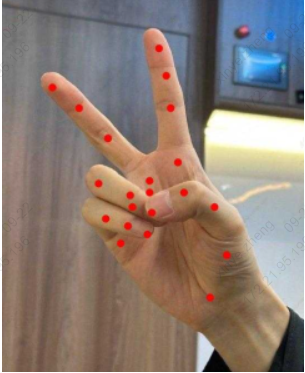
Input a hand image here, and the algorithm will identify its key points. The key points here are the scale coefficients, and multiplying them by the corresponding length and width will give the coordinate points.
obj_meta id: 0, [x, y]: 0.667969, 0.796875
obj_meta id: 0, [x, y]: 0.726562, 0.683594
obj_meta id: 0, [x, y]: 0.683594, 0.570312
obj_meta id: 0, [x, y]: 0.578125, 0.531250
obj_meta id: 0, [x, y]: 0.484375, 0.523438
obj_meta id: 0, [x, y]: 0.578125, 0.451172
obj_meta id: 0, [x, y]: 0.546875, 0.314453
obj_meta id: 0, [x, y]: 0.539062, 0.225586
obj_meta id: 0, [x, y]: 0.523438, 0.153320
obj_meta id: 0, [x, y]: 0.484375, 0.500000
obj_meta id: 0, [x, y]: 0.345703, 0.386719
obj_meta id: 0, [x, y]: 0.250000, 0.314453
obj_meta id: 0, [x, y]: 0.168945, 0.257812
obj_meta id: 0, [x, y]: 0.427734, 0.570312
obj_meta id: 0, [x, y]: 0.322266, 0.500000
obj_meta id: 0, [x, y]: 0.427734, 0.539062
obj_meta id: 0, [x, y]: 0.500000, 0.578125
obj_meta id: 0, [x, y]: 0.386719, 0.652344
obj_meta id: 0, [x, y]: 0.330078, 0.597656
obj_meta id: 0, [x, y]: 0.417969, 0.605469
obj_meta id: 0, [x, y]: 0.484375, 0.628906
The following pictures show how to mark images based on key points:
7.4. sample_keypoints
It is used for multi-type key point detection, supports inputting a single picture, and outputs key point coordinate information of hand /license plate/human posture and visual annotation images. Unlike sample_detect_keypoints, this interface requires a cropped image as input. The operation is as follows:
./sample_keypoints -m ./cv181x/keypoint_hand_128_128_INT8_cv181x.cvimodel -i ./test_inputs/hand.jpg -o out.jpg
// -m input model -i input image -o output image, you can leave it blank
Here we input a hand image, and the algorithm will identify its key points. The image marked according to the key points is as follows:
7.5. sample_face_attribute
Used for face detection and attribute analysis scenarios, it supports inputting a single image and outputting face location and attribute information such as gender, age, glasses, and masks. The operation method is as follows :
./sample_face_attribute -m ./cv181x/scrfd_500m_bnkps_432_768.cvimodel,./cv181x/face_attribute_cls.cvimodel -i ./test_inputs/face.jpg
// -m input model, this sample needs to input two models, namely face detection and face attribute recognition
// -i input image
Here we input a face image, and the algorithm will recognize the various attributes of the face into the image and the results are as follows:

gender score: 0.992188, age score: 0.640625, glass score: 0.992188, mask score: 0.000000
Gender:Male
Age:Male
Glass: Yes
Mask: no
7.6. sample_face_detection
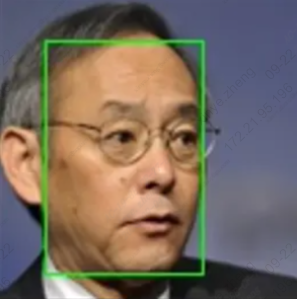
It is used for general face detection. It supports inputting a single image and outputting the result image with the face detection frame marked. It also outputs the xy coordinates of the upper left corner and the lower right corner of the face frame, as well as the confidence score. It runs as follows:
./sample_face_detection -i ./test_inputs/face.jpg -m ./cv181x/scrfd_det_face_432_768_INT8_cv181x.cvimodel -o ./test_inputs/face_det.jpg
// -m input model -i input image -o output image, you can leave it blank
Here we input a face picture and mark the face according to the output frame diagram
7.7. sample_feature_extraction
Used for face comparison scenarios, it supports inputting two face images and outputting their similarity scores and intermediate processing result images. The operation method is as follows :
./sample_face_landmark -m ./cv181x/keypoint_face_v2_64_64_INT8_cv181x.cvimodel -i ./test_inputs/face.jpg
// -m input model -i input image
Two images are input here for comparison after feature extraction. When two identical images are input, the similarity is 1.
similarity is 1.000000
7.8. sample_face_landmark
It is used for facial key point detection scenarios and outputs the image blur score and the coordinates of the five facial key points. The operation method is as follows :
./sample_face_landmark -m ./cv181x/keypoint_face_v2_64_64_INT8_cv181x.cvimodel -i ./test_inputs/face.jpg
// -m input model -i input image
Based on the input image, the serial port will output key point information
landmarks id : 0, landmarks x : 43.531250, landmarks y : 51.625000
landmarks id : 1, landmarks x : 73.500000, landmarks y : 51.625000
landmarks id : 2, landmarks x : 63.875000, landmarks y : 65.187500
landmarks id : 3, landmarks x : 45.937500, landmarks y : 82.250000
landmarks id : 4, landmarks x : 68.687500, landmarks y : 81.375000
7.9. sample_instance_segmentation
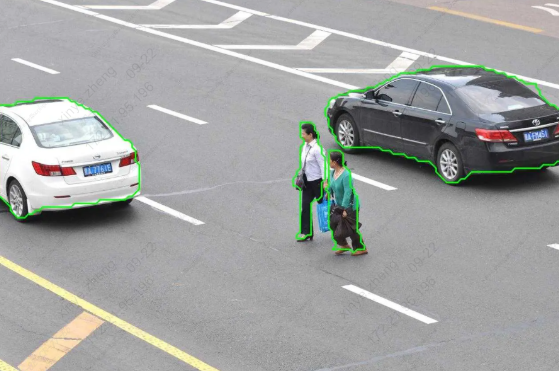
It is used for instance segmentation scenes. It inputs an image data and outputs the coordinate box and contour coordinate points of each instance. The operation method is as follows :
./sample_instance_segmentation -i ./test_inputs/coco.jpg -o ./test_inputs/coco_o.jpg -m ./cv181x/segmentation_yolov8n_640_640_INT8_cv181x.cvimodel
// -m input model -i input image -o output image, you can leave it blank
Enter a picture here and the algorithm will segment it
7.10. sample_lane_detection
It is used for lane line detection scenarios, supports inputting road images, and outputs the detected lane line coordinate information. The operation method is as follows :
./sample_lane_detection -m ./cv181x/lstr_det_lane_360_640_MIX_cv181x.cvimodel -i ./test_inputs/result.jpg -o ./out.jpg
// -m input model -i input image -o output image, you can leave it blank
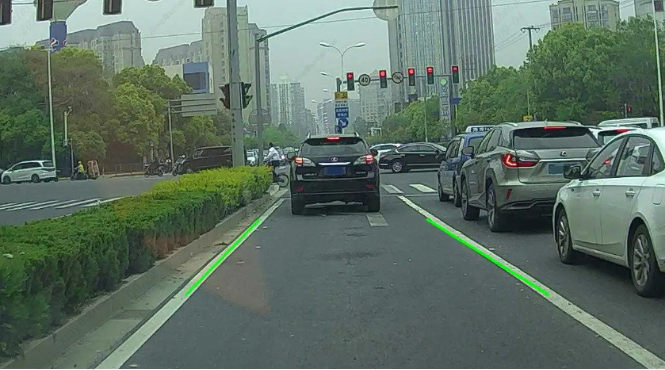
Here we input a lane line picture, and the serial port will print the lane line information:
lane 0
0: 506.925018 432.000031
1: 362.094147 576.000000
lane 1
0: 815.652710 432.000031
1: 1038.046509 576.000000
Label the image based on the results:
7.11. sample_object_detection
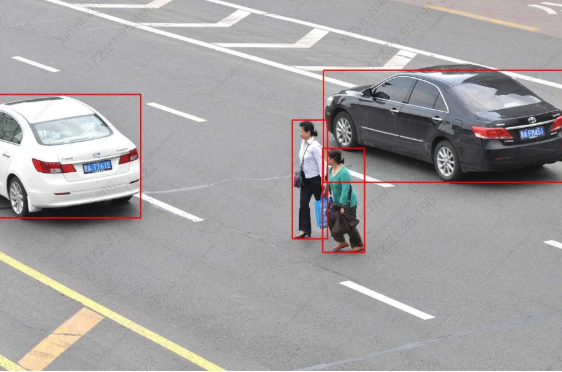
For general target detection sample, output the xy coordinates of the upper left corner and the lower right corner of the target box, category and confidence. For specific models that are compatible, please refer to get_od_model_info in sample_object_detection.c . The operation method is as follows:
./sample_object_detection -m ./cv181x/coco80_detection_yolov10n_640_640_INT8_cv181x.cvimodel -i ./test_inputs/coco.jpg -o ./out.jpg
// -m input model -i input image -o output image, you can leave it blank
Enter a picture here, and the serial port will print the recognized object category and block diagram
obj_meta_index: 0, class_id: 0, score: 0.943986, boxx: [2.527201 327.880676 226.529968 507.681152]
obj_meta_index: 1, class_id: 0, score: 0.918415, boxx: [740.277466 1285.450562 171.033188 427.008545]
obj_meta_index: 2, class_id: 4, score: 0.850404, boxx: [738.621460 834.782410 348.960632 586.001221]
obj_meta_index: 3, class_id: 4, score: 0.800627, boxx: [669.198853 750.732361 284.652740 555.387817]
Label the image based on the results:
7.12. sample_pose
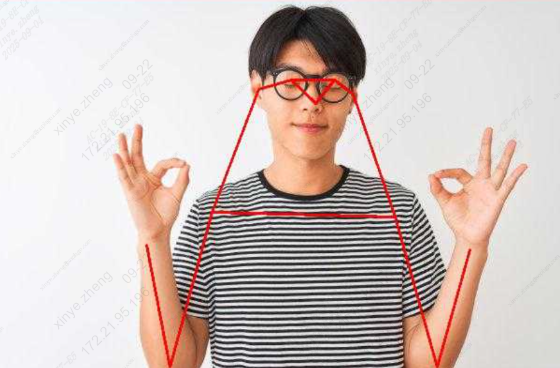
It is used for human pose estimation. It supports inputting a single image, outputting the coordinates of 17 key points of the human body and skeleton connection information, and generating a visual result graph with key points and skeleton annotations. The operation method is as follows:
./sample_pose -m ./cv181x/keypoint_yolov8pose_person17_384_640_INT8_cv181x.cvimodel -i ./test_inputs/person.jpg -o ./test_inputs/person_out.jpg
// -m input model -i input image -o output image, you can leave it blank
Enter a picture here, and the serial port will display the coordinate points and scores of the posture
obj_meta_index: 0, class_id: 0[79270.104763], score: 0.934758, bbox: [45.138302 249.390228 102.585884 354.314575]
pose: 0: 142.950653 160.520309 0.980407
pose: 1: 149.029053 148.363525 0.924847
pose: 2: 124.715469 148.363525 0.962615
pose: 3: 161.185822 154.441910 0.573295
pose: 4: 100.401848 166.598709 0.814048
pose: 5: 197.656219 221.304276 0.962615
pose: 6: 82.166672 245.617874 0.986373
pose: 7: 228.048203 324.637054 0.802613
pose: 8: 63.931477 336.793823 0.924847
pose: 9: 136.872238 342.872223 0.778173
pose: 10: 88.245079 257.774658 0.901571
pose: 11: 191.577805 379.342621 0.573295
pose: 12: 112.558662 391.499390 0.676617
pose: 13: 161.185822 403.656189 0.070180
pose: 14: 100.401848 397.577789 0.098429
pose: 15: 100.401848 391.499390 0.012670
pose: 16: 106.480255 367.185822 0.015762
Label the image based on the results:
7.13. sample_semantic_segmentation
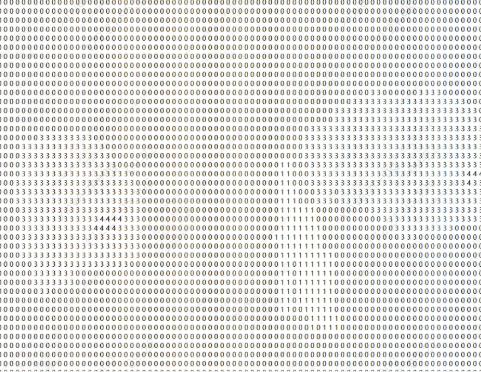
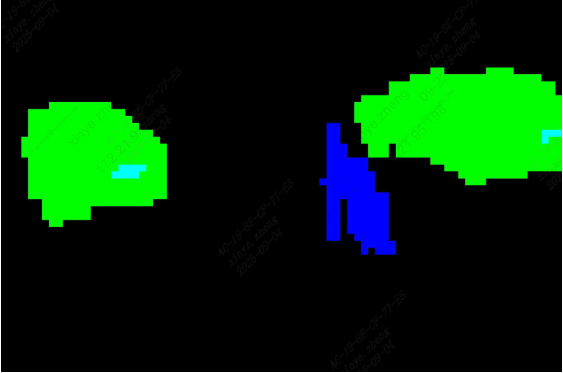
It is used for semantic segmentation scenarios. It inputs an image and outputs the category information of each pixel. The operation is as follows :
./sample_semantic_segmentation -m ./cv181x/topformer_seg_person_face_vehicle_384_640_INT8_cv181x.cvimodel -i ./test_inputs/topformer.jpg -o out.jpg
// -m input model -i input image -o output image, you can leave it blank
Enter a picture here, and the serial port will print the category corresponding to each pixel point in the image
7.14. sample_tracking
Track the input image group. The operation is as follows :
./sample_tracking -m ./cv181x/scrfd_det_face_432_768_INT8_cv181x.cvimodel,./cv181x/mbv2_det_person_512_896_INT8_cv181x.cvimodel -i input -o output
// -m input model, this sample needs to input two models, namely face detection and pedestrian detection
// -i inputs the image folder, which contains a group of pictures. The pictures need to be arranged in the order of xxx_001.jpg, xxx_002.jpg, as shown below
// -o output image folder
Example of input image group:
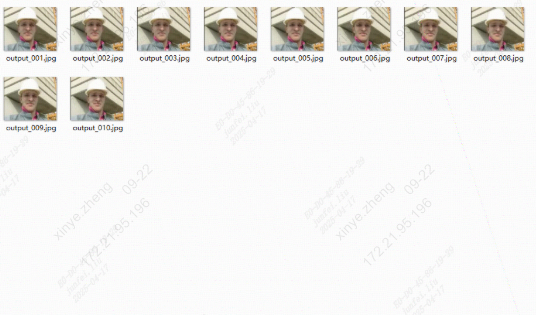
Example of input image group:
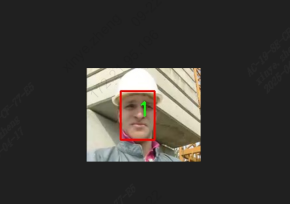
7.15. sample_face_recognition
Recognize faces and perform feature matching: face detection -> facial feature point extraction -> facial feature value extraction -> feature point comparison. The operation is as follows:
./sample_face_recognition -m ./cv181x/scrfd_det_face_432_768_INT8_cv181x.cvimodel,./cv181x/key point_face_v2_64_64_INT8_cv181x.cvimodel,./cv181x/feature_cviface_112_112_INT8_cv181x.cvimodel -i ./test_inputs/face.jpg,./test_inputs/face.jpg -c ./model_factory.json
// -m input model, this sample needs to input three models, namely face detection, facial feature points, and facial feature values
// -i input image, this sample needs to input two images for face comparison after extracting eigenvalues
// -c config parameter, records the parameter settings of the model
Input two identical images and the obtained eigenvalues are similar.
similarity is 1.000000
7.16. sample_licence_recognition
License plate recognition: detection -> key points -> recognition, supporting multiple license plates per image. The operation is as follows:
./sample_licence_recognition -m ./cv181x/yolov8n_det_license_plate_384_640_INT8_cv181x.cvimodel,./cv181x/keypoint_license_pl ate_64_128_INT8_cv181x.cvimodel,./cv181x/recognition_license_plate_24_96_MIX_cv181x.cvimodel -i ./test_inputs/out_vertical_cv.jpg
// -m input model, this sample needs to input three models, namely license plate detection, license plate key points, and license plate recognition
// -i input image
Here is an input image containing two license plates:
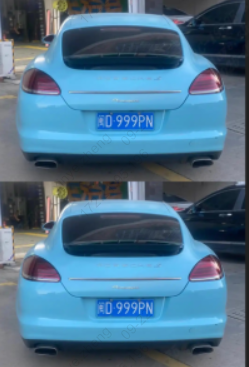
The serial port will print the following:
id = 0, txt info: MinD999PN
id = 1, txt info: MinD999PN
7.17. sample_vi_detection
Connect the camera for object recognition. Place sensor_cfg.ini (the sensor configuration file can be obtained by contacting the developer) in the /mnt/data directory and run the following command:
./sample_vi_detection -m ./cv181x/yolov8n_det_hand_384_640_INT8_cv181x.cvimodel -c 0
// -m input model, the example here is hand detection
// -c vi chn is 0 for a single sensor
// -f config parameter, records the parameter settings of the model, which can be omitted
Here we take hand detection as an example, and the information of the detected hand will be printed out.
obj_meta_index : 0, class_id : 0, score : 0.861538, bbox : [260.416077 601.567139 103.850037 312.489624]
7.18. sample_vi_face_pet_cap
Connect the camera to capture faces and pets. If the -g parameter is entered, feature point recognition will be performed. If the -o parameter is entered, the captured image will be saved.
//json file parsing, during use, model_dir and model_config must be modified according to the actual situation
{
"model_dir": "/mnt/sd/models/", // The model path will automatically match cv181x, cv184x, etc., so the actual model path is /mnt/sd/models/cv181x. Here, the model must be placed in the cv181x folder (modified according to the board type) first, and then placed in the model_dir path
"model_config": "/mnt/sd/configs/model/model_factory.json", //Model parameter file
"frame_buffer_size": 1,
"pipelines": [
{
"name": "face_pet_cap",
"nodes": {
"object_detection_node": {
"config_thresh": 0.5
},
"track_node": {
"fuse_track": true
},
"snapshot_node": { //Snapshot parameters
"snapshot_interval": 5,
"min_snapshot_size": 40,
"crop_size_min": 128,
"crop_size_max": 256,
"snapshot_quality_threshold": 0,
"crop_square": true
}
}
}
]
}
The gallery folder is not provided in tdl and needs to be generated by yourself. Note that it must be in the format of 0.bin, 1.bin, etc. The feature value can be obtained using TDL_FeatureExtraction (parameters of TDL_FeatureExtraction above), It can also be obtained from the TDLCaptureInfo structure in this sample, after TDL_APP_Capture. If a face is recognized, the prt in the TDLFeature parameter in TDLCaptureInfo will record the feature value and save it as a file. The following figure is a reference
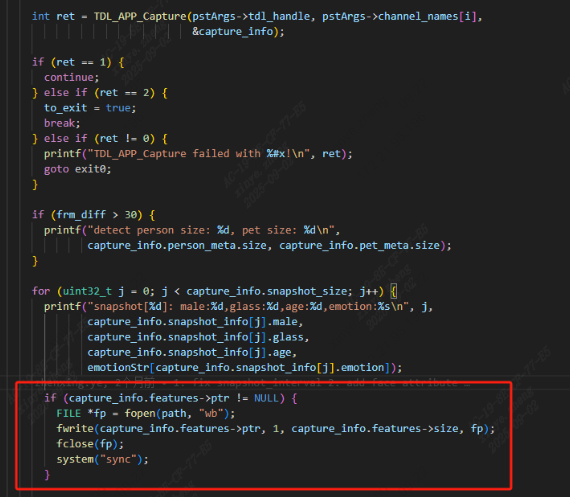
Place sensor_cfg.ini (the sensor configuration file can be obtained by contacting the developer) in the /mnt/data directory and run the following command
./sample_vi_face_pet_cap -c ./config/face_pet_cap_app.json -v 0 -g ./ipcamera/gallery/ -o out
// -m configures the json file to record which functions to use
// -v vi chn is 0 for a single sensor
// -g eigenvalue database, you can leave it blank
// -o output folder, you can leave it blank
7.19. sample_vi_consumer_counting
Connect a camera to count the number of people who visit your site. The operation is as follows :
./sample_vi_consumer_counting -c ./config/consumer_counting_app_vi.json -v 0
The output is as follows:
enter: 0, miss: 0
+++++++++++++++++++++++++++++ frame:124, infer time:40.00, fps: 25.00
7.20. sample_vi_cross_detection
Connect a camera for intrusion detection. Here’s how it works :
./sample_vi_cross_detection -c ./config/cross_detection_app_vi.json -v 0
The output is as follows:
cross num: 0
+++++++++++++++++++++++++++++++ frame:62, infer time:40.00, fps: 25.00
7.21. sample_vi_single_object_tracking
Connect the camera for monocular tracking, and TDL_Detection detects the target when the program starts running. When you need to track an object or an area, press I or i to enter the parameters. You can enter the box id (range 0 - bj_meta.size), the box coordinates (x1, y1, x2, y2) or a coordinate point (x, y); After the input is completed, the target is tracked. If the target is lost for more than 5 seconds, the TDL_Detection detection phase is resumed. Here’s how to run it :
./sample_vi_single_object_tracking -d ./cv181x/yolov8n_det_person_vehicle_384_640_INT8_cv181x.cvimodel -s ./cv181x/tracking_feartrack_128_128_256_256_INT8_cv181x.cvimodel
// -d detection model -s tracking model
The output is as follows:
Usage: input i or I to start tracking......
Enter bbox x1,y1,x2,y2 or a point x,y or bbox index to track:
0 //Track target with id 0
values[0] = 0
The target has been lost for more than 5 seconds, switching to detection state //When the target is lost for more than 5 seconds, return to the detection state
Usage: input i or I to start tracking......
7.22. sample_motion_detection
Motion detection takes a background image and a detection image as input. The operation is as follows :
./sample_motion_detection ./test_inputs/ir.jpg ./test_inputs/ir.jpg

The output is as follows:
Running motion detection with images:
Background: ./test_inputs/ir.jpg
Detect: ./test_inputs/ir.jpg
Setting ROI regions...
Begin motion detection...
Detection completed
7.23. sample_intrusion_detection
Intrusion detection. It works as follows :
./sample_intrusion_detection
The output is as follows:
=============Rectangular Area Test=============
==== Rectangular Area ====
Points: 4
Point 0: (100.00, 100.00)
Point 1: (300.00, 100.00)
Point 2: (300.00, 200.00)
Point 3: (100.00, 200.00)

Internal Bounding Box Detection: Intrusion
External bounding box detection: No intrusion

=============Concave Polygon Area Test=============
==== Concave Polygonal Area ====
Points: 6
Point 0: (100.00, 100.00)
Point 1: (200.00, 50.00)
Point 2: (300.00, 100.00)
Point 3: (250.00, 150.00)
Point 4: (200.00, 120.00)
Point 5: (150.00, 150.00)

Internal Bounding Box Detection: Intrusion
External bounding box detection: No intrusion

Testing completed!
8. Frequently Asked Questions
8.1. Model opening failure issues
Lack of model_config_json
[tdl_model_factory.cpp:80] [I] input model config file is empty, load model config from /configs/model/model_factory.json
[tdl_model_factory.cpp:87] [E] model config file not found: /configs/model/model_factory.json
[tdl_model_factory.cpp:238] [E] model config not found for model type: YOLOV8N_DET_PERSON_VEHICLE
[tdl_model_factory.cpp:248] [I] getModelInstance model_type:YOLOV8N_DET_PERSON_VEHICLE
[tdl_model_factory.cpp:526] [I] createObjectDetectionModel success,model type:5,category:0
[tdl_model_factory.cpp:831] [I] model_path: ./cv184x/yolov8n_det_person_vehicle_384_640_INT8_cv181x.cvimodel
[tdl_model_factory.cpp:238] [E] model config not found for model type: TRACKING_FEARTRACK
[tdl_model_factory.cpp:248] [I] getModelInstance model_type:TRACKING_FEARTRACK
[tdl_model_factory.cpp:831] [I] model_path: ./tracking_feartrack_128_128_256_256_INT8_cv181x.cvimodel
[base_model.cpp:159] [E] mean or std size is not 3
[base_model.cpp:42] [E] Net setup failed
It can be seen that the parameters lack mean and std. This is because the model_config_json parameter is not passed when calling TDL_OpenModel. Most proprietary models do not need to be passed in. Some common models, such as feature extraction and voice commands, require model configuration information to be passed in. Please refer to configs/model/model_config.json.