5.1. Overview of MLIR-Migration Tool
TPU-MLIR is a compiler project tailored for the intelligent vision deep learning processors from SOPHGO. This project offers a comprehensive toolchain capable of converting pre-trained neural networks from various frameworks into efficiently computable model files (bmodel) on the intelligent vision deep learning processors of SOPHGO.
The TPU-MLIR toolchain has several advantages, including fast iteration and update, strong adaptability, easy deployment, and strong compatibility. it is recommended to use TPU-MLIR for model conversion.
The code has been open sourced on GitHub: https://github.com/sophgo/tpu-mlir.
The paper <https://arxiv.org/abs/2210.15016> describes the overall design concept of TPU-MLIR.
The SOPHGO series of intelligent vision deep learning processor platforms only support BModel model acceleration. Users need to perform model migration first. By using the SOPHGO MLIR toolchain, models trained in other frameworks can be converted into BModel, which can run on the SOPHGO series of intelligent vision deep learning processors.
MLIR already directly supports most open-source framework operators and models (Pytorch, ONNX, TFLite, Caffe, etc.), while other models (TensorFlow, PaddlePaddle, etc.) need to be converted to ONNX models before being converted, as shown in the TPU-MLIR toolchain overall architecture diagram. More network layers and models are also continuously being supported.
For detailed information on model support and conversion methods, please refer to the TPU-MLIR Development Reference Manual. This chapter also provides a quick deployment guide, please follow the next section.
The overall architecture of TPU-MLIR is shown below:
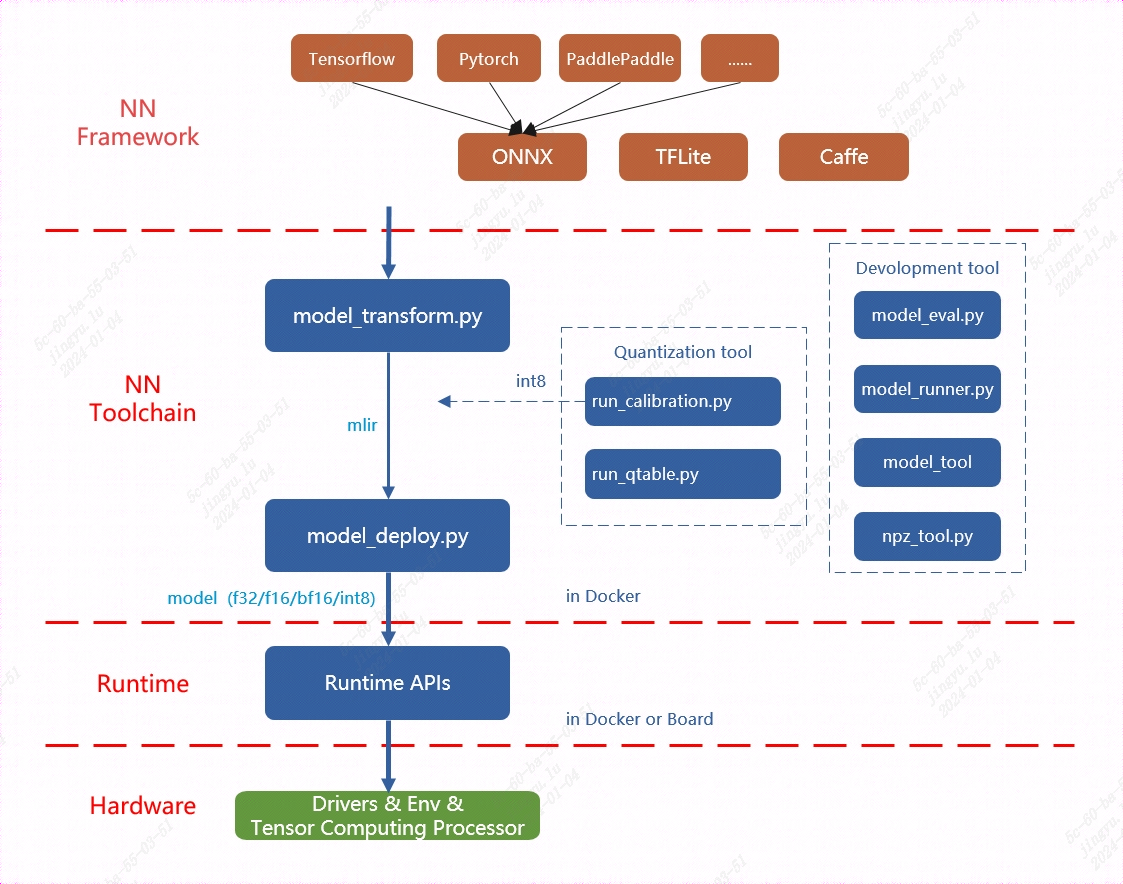
Fig. 5.1 TPU-MLIR overall architecture
The provided TPU-MLIR toolchain can facilitate more efficient model migration. For the BM1684/BM1684X platform, it supports both float32 models and int8 quantization models. The model conversion process and chapter introduction are shown in the figure below:
TPU-MLIR model conversion process is shown below:
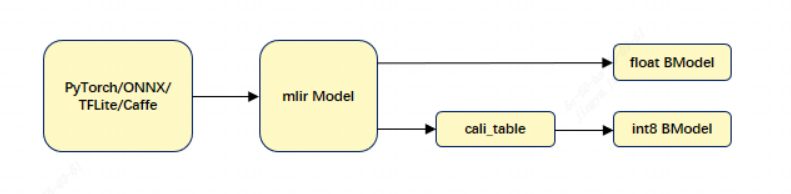
Fig. 5.2 TPU-MLIR model conversion process
Model conversion needs to be executed in a specified docker environment, which is mainly divided into two steps. First, use the model_transform.py script to convert the original model into an MLIR file. Then, use the model_deploy.py script to convert the MLIR file into a BModel.
When generating FLOAT models, the model_deploy.py tool supports outputting three floating-point data types: F32, F16, and BF16. For details, please refer to FLOAT Model Generation (MLIR). For INT8 models, user need to prepare a quantization dataset, call run_calibration.py to generate a calibration table, and then pass the calibration table to model_deploy.py. If the INT8 model does not meet the accuracy requirements, user can call run_qtable.py to generate a quantization table to determine which layers use floating-point calculations, and then pass it to model_deploy.py to generate a mixed-precision model. For details, please refer to Using TPU-MLIR for Model Quantization.
The TPU-MLIR toolchain provides the model_transform.py and model_deploy.py model conversion scripts. The model_transform.py tool performs offline conversion of models from various frameworks, generating MLIR format model files. The model_deploy.py tool can achieve one-click conversion of models in the MLIR (The custom model intermediate format framework of SOPHGO) framework: generating instruction streams that can be executed by intelligent vision deep learning processors and serializing them into BModel files. When performing online inference, BMRuntime is responsible for reading the BModel model, copying and transferring data, executing inference on the intelligent vision deep learning processor, and reading the calculation results.
Note
If user encounter any problems during use, please contact us for technical support.